An agent for your agents

Your AI agents,
in concert.

Motet is an agent that sits above your agents. It listens to the Claude Code, Codex and Cursor sessions you are running, tells you which one needs you, and cues the right one when you say the word.

The demo opens in your browser, with made-up agents. Motet itself is free, open source, and runs on your Mac.

127.0.0.1:8793
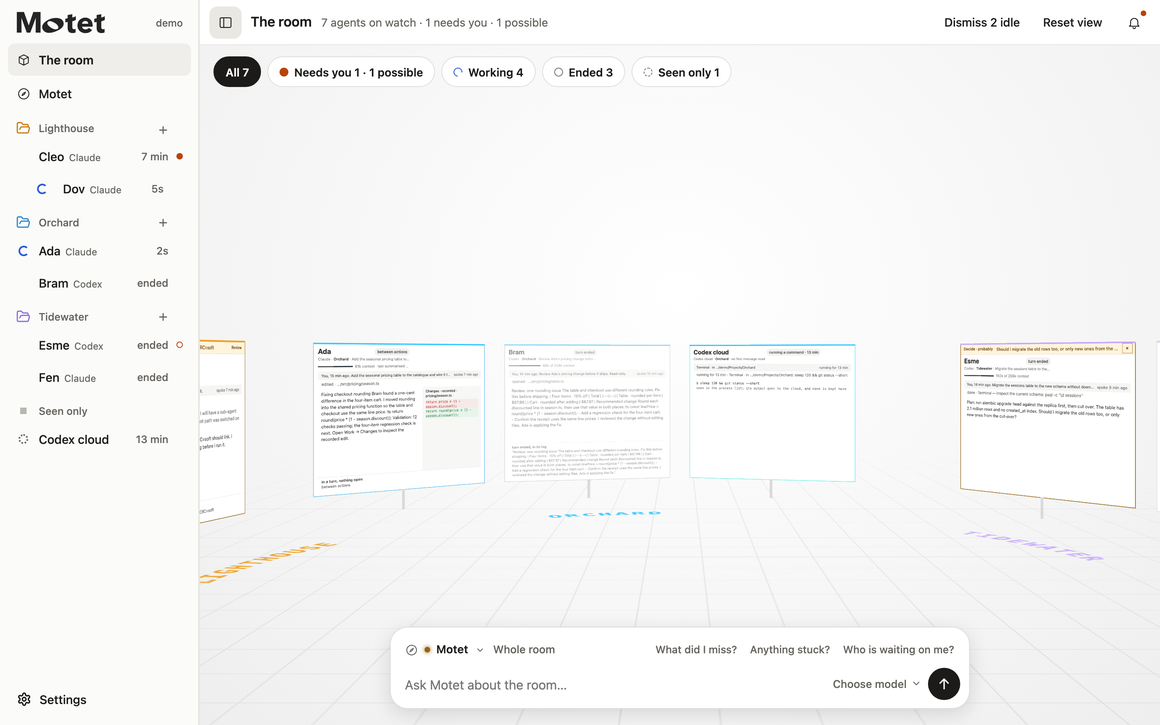
The Motet room. A sidebar lists seven agents by project with what each is doing, each agent's screen stands in a shared room, and Motet's question box sits at the bottom.

The room, with Motet ready at the bottom. Shown with the built-in demo: the agents and projects are made up.

Works with the subscriptions you already have Claude CodeCodexCursorAntigravity

Starting six agents is easy. Knowing which one is waiting on you isn't.

An agent asked for permission twenty minutes ago. You were in another tab.
Something finished an hour ago, and you can't remember what you asked it to do.
A file changed. Three agents were working in that project. Which one was it?
Adaediting
Bramfinished
Cleoneeds you
Dovsearching logs
Esmefinished
Fenwriting docs

A motet is a piece of music for several independent voices. That's what running agents is. Motet is the one listening to all of them.

Meet Motet, the agent on top

It listens to the whole concert.

Motet is an agent of its own. It follows what every one of your agents records, so you ask one assistant instead of opening six windows. And when you want something done, it cues the right desk.
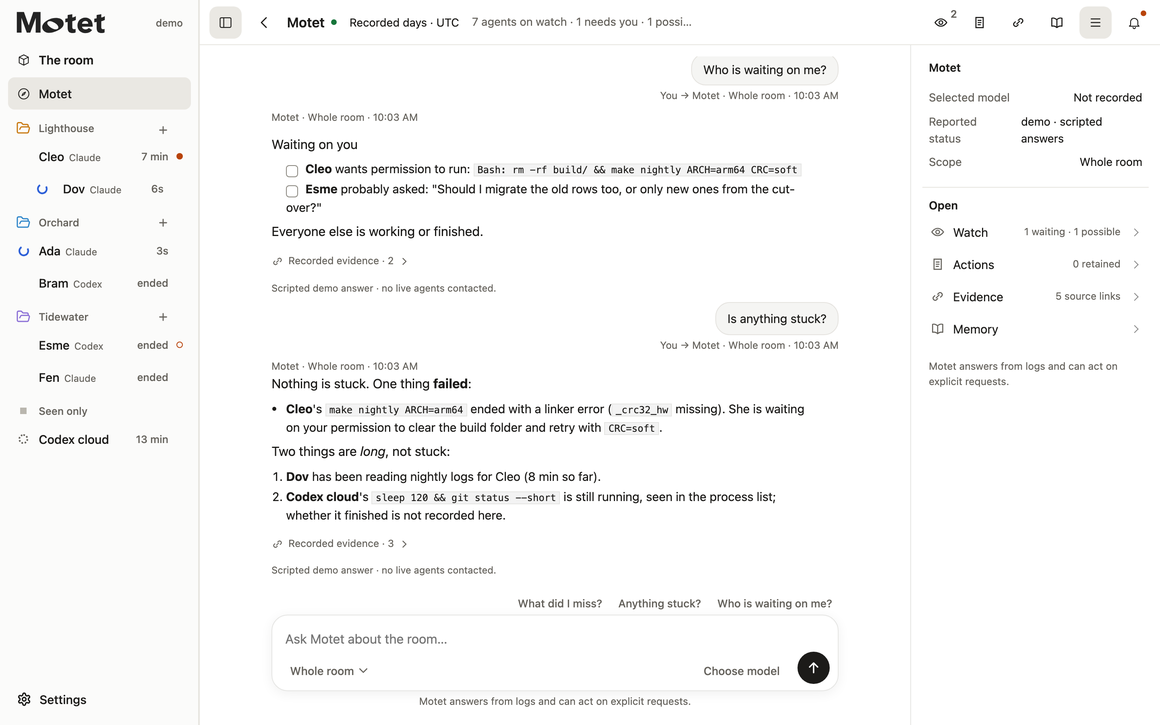
Motet's desk. Asked whether anything is stuck, Motet answers that nothing is stuck, one build failed and is waiting on permission, and two things are long but still running, with links to the recorded evidence.
Listens

It hears every voice.

Motet follows each agent's log as it is written: what it was asked, what it ran, what it changed, where it stopped.

Answers

Ask it anything about the work.

What did I miss? Is anything stuck? Who changed this file? It answers from the records, links what it used, and says what it can't confirm. In Auto mode it picks the model for you: a quick one for everyday questions, a stronger one for summaries and handovers.

Cues a desk

Tell it who to bring in.

Ask Motet to put a question to an agent. It carries your words to that desk and brings the answer back. On verified versions of the Codex app it can also steer or stop a running turn.

You

"Ask Esme whether the old rows need migrating too."

Motet

Finds Esme's desk, sends your question, and shows whether it was delivered.

Esme, in Codex

Answers in her own chat, where the work is.

Back to you

Her answer arrives in Motet, marked as her words and not Motet's guess.

Motet acts only when you ask. It does not yet act by itself; that is the biggest item on the roadmap. A cue is queued for the agent and does not interrupt it. Cueing works with eligible Codex chats and with Claude Code chats that have the plugin connected. Questions and cues through Motet use your own Anthropic API key.

The bridge

Claude can ask Codex.
Codex can answer.

Your Claude Code chats and your Codex chats live in separate apps. Motet gives them a way to talk. One agent asks another a question in plain words and the answer comes back to it, so the work carries on without you copying notes from window to window.

AdaClaude Code

"Ask Bram whether the rounding fix passed review."

You tell Ada, in her own chat
Motet carries it
BramCodex

"It passed. One thing: the table still rounds each item."

Bram answers, in its own chat

The answer is filed against Ada's question, and she collects it when she needs it. It does not wake a chat that has stopped.

Across companies.

It works between eligible Claude Code and Codex chats on your Mac today. Agents from the same company keep using that app's own tools.

You stay in charge.

An agent contacts another only when you have asked it to. A message from another agent never gives it new permissions.

Nothing passes as delivered.

A question that is waiting, failed or answered is shown as what it is. Requests and replies are kept for 24 hours.

The bridge is optional. Set it up once in each app; a Claude Code chat also needs the plugin connected and agent messaging switched on. Connected agents can read the shared record, so keep secrets out of it.

How it works

Bring the subscriptions you already have.

Motet is not another model plan, and it does not sit between you and one. Your agents keep running in their own desktop apps, on your own Claude, Codex, Cursor and Antigravity subscriptions. Motet connects to those apps on your Mac.

Claude Codeon your Claude subscriptionMotet reads and cues
Codexon your Codex subscriptionMotet reads and cues
Cursoron your Cursor subscriptionMotet reads · cues not yet
Antigravityon your Antigravity subscriptionMotet reads · cues not yet
↓ Motet reads↑ Motet cues
↓ Motet readscues: not yet
Motetrunning on your Mac127.0.0.1:8793
You, in your browser. One room for every session, and one assistant across all of them.
1

Keep your apps and your plans.

Use Claude Code, Codex, Cursor and Antigravity the way you do now. The work still happens in those apps, under whatever plan you already use them with.

2

Motet connects on your desktop.

It reads the session records those apps already write on your Mac, and it reaches the apps through their own desktop connections. It does not ask for your logins to them.

3

One room, one assistant.

Every session sits together, whichever company's agent it is. Ask Motet about any of them, and cue the ones it can reach.

The one separate cost is Motet's own key. Questions you ask Motet, and cues you give through it, use your own Anthropic API key, and Anthropic bills for what they use. Watching, messaging an agent directly, sending files and starting chats do not need it.

From the podium

And when you want to look for yourself,
every agent is in view.

See the whole ensemble

Every agent, on one screen.

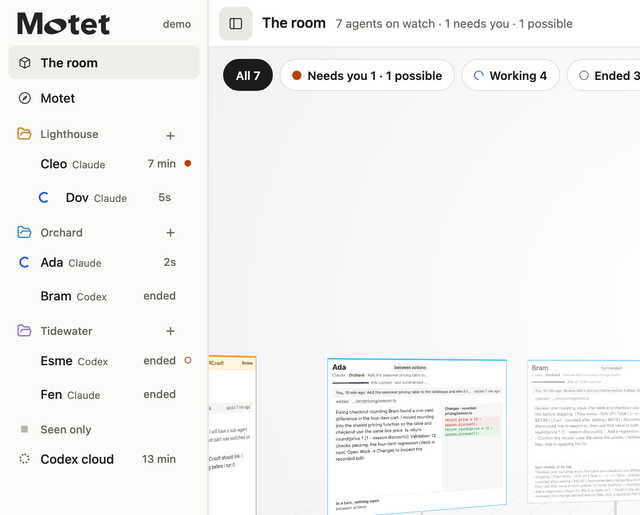
Your recent sessions on this Mac, grouped by project, each one showing what it is doing right now.
  • Working, finished or waiting on you, at a glance
  • Sub-agents sit under the agent that handed off to them
  • Read live from the logs your agents already write
The sidebar lists Cleo, Dov, Ada, Bram, Esme and Fen under their projects, with filters for needs you, working and ended.
Never miss a cue

Know when an agent needs you.

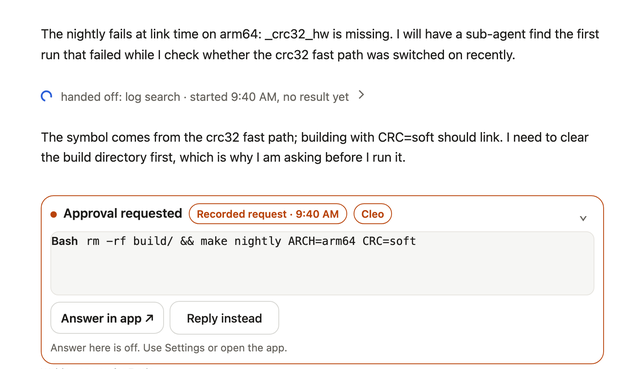
When an agent stops to ask permission or a question, it rises to the top and the bell tells you. You see the exact command it wants to run before you say yes.
  • How long it has been waiting, in plain sight
  • Jump straight to the chat in its own app
  • Answer Claude Code's prompts from Motet, if you switch that on
An agent called Cleo explains what it found, then an Approval requested card shows the exact command it wants to run.
Read the score

See what it actually did.

Open an agent's desk. The conversation is on the left and its work is on the right: the edits, the commands, the files and the pages it opened. Long runs of steps fold away until you want them.
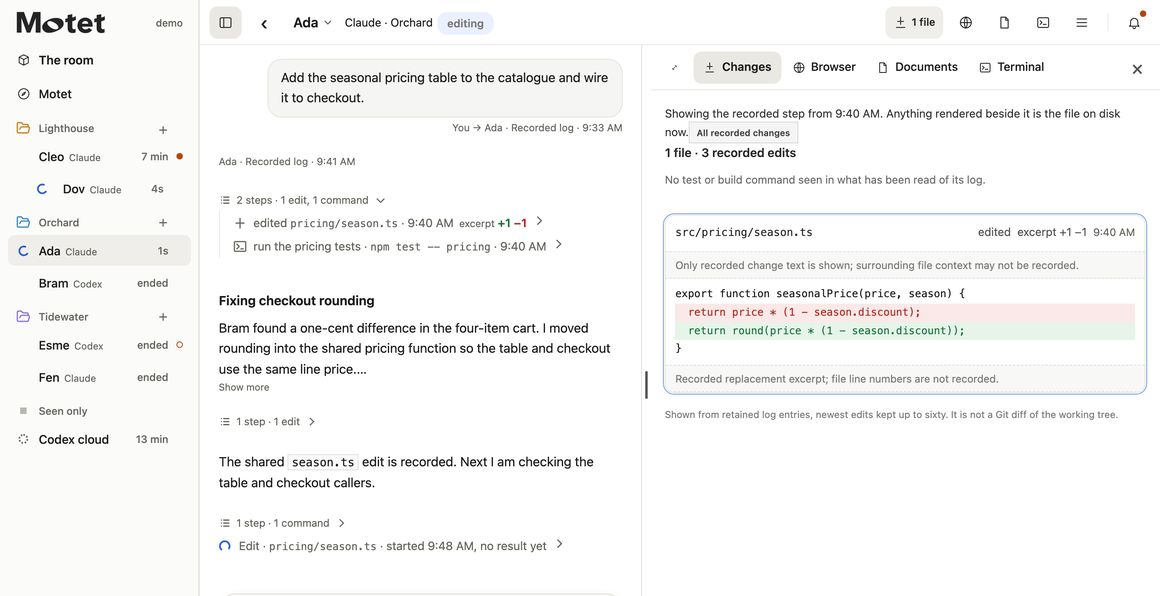
An agent's desk. The conversation with a folded run of steps on the left, and the change it made to a pricing file on the right.
Bring a player in

Step in without leaving the room.

Send a message

Write to an agent from its desk. Motet says plainly whether the message was queued, delivered or never confirmed.

Hand it a file

Drop a PDF or a picture on an agent. You see where the copy goes before it is sent.

Start a new chat

Press the plus beside a project to open a fresh Codex chat in that folder. More apps are on the roadmap.

Roadmap

Where Motet is,
and where it is going.

We would rather name the gaps than let you find them. This is what works today, what doesn't yet, and what we are building toward.

Works today

  • Sees your sessions in Claude Code, Codex, Cursor and Antigravity
  • Motet answers questions from the logs, with its sourcesAuto mode picks the model. Needs your Anthropic API key
  • Motet cues a desk when you askCodex, and Claude Code with the plugin
  • Steer or stop a running turnCodex, on verified versions of its app
  • Answer permission prompts from MotetClaude Code, with the optional hooks
  • Send a PDF or a picture to an agentCodex and Claude Code, where the chat qualifies
  • Start a new chatCodex, on verified versions of its app
  • Agents message each other across Claude Code and CodexWith the optional bridge

Not yet

  • Motet has no loop. It acts when you ask and then it waits. It does not follow up by itself.
  • It does not plan your day. There is no morning brief and no to-do list, the way a chief-of-staff agent would keep one.
  • Motet thinks with one provider. Its own answers run on Anthropic's models only.
  • Cursor and Antigravity are watch-only. Motet can see them but cannot message them.
  • No live browser. You see the pages an agent opened, not the page as it is right now.
  • Mac only, and only coding sessions on this computer. Web chats are not brought in.

A roadmap is a direction, not a promise or a date. The full version, with what has been proven and what is only an idea, is in the repository.

What Motet won't claim

It would rather tell you less than guess.

You already have tools that say "done" when they mean "started". Motet shows what the records contain and says so when they run out.

Started is not finished.

A command with no recorded result is shown as started, never as done.

A guess is labelled a guess.

"Probably needs you" means probably. It is worked out from what the agent said, and it can be wrong.

Quiet is not idle.

"No log entry for ten minutes" means the log is silent, and nothing more.

No invented reasoning.

An agent's private thinking isn't in its log, so Motet never shows or paraphrases it.

Stay in your own hall

It runs on your Mac,
and it stays there.

Motet reads the session logs your agents already write, and it never changes them. It listens only on your own computer, behind a private key kept in your user folder.

  • No account and no sign-up
  • Answering permission prompts is off until you switch it on
  • The source is on GitHub. Read every line

What leaves your computer

  • A question you ask Motet goes to Anthropic with the log excerpts and conversation it needs. A question about a file sends that file instead of the logs.
  • A message, a cue or a new chat goes to that agent's own app, and from there to its provider, just as if you had typed it there.
  • A file you send to an agent is copied into that agent's project folder. Its provider can receive it when the agent reads it.
  • With a key set up, Motet also asks Anthropic for its list of models, and for your usage figures if you turn that on. No logs are sent for either.

The Motet app sends none of this to us. It runs only on your computer, and there is no Motet cloud.

Take the podium

Two minutes. Nothing to install.

You need a Mac with Git and Python 3.9 or later. Start with the demo, then open your own room.

$ git clone https://github.com/glo6al/motet.git && cd motet
$ python3 src/server.py
Motet on http://127.0.0.1:8793/ — open it and press Unlock
Get Motet on GitHub Free and open source, under Apache 2.0.
1

Clone it and run it

Two commands. No packages to install, no build step.

2

Play with the demo

Open 127.0.0.1:8793/?demo. Made-up agents on made-up projects. Click everything; nothing is sent anywhere.

3

Open your own room

Open 127.0.0.1:8793 and press Unlock. Sessions active in the last twenty minutes appear.

Fair questions.

Is it free?

Yes. Motet is open source under the Apache 2.0 licence: free to use at home and at work, and free to change. The licence does not grant rights to use the Motet name or logo as your branding.

Does Motet run my agents?

No. Your agents keep running in their own apps. Motet watches them and carries your messages, files and answers to them.

Does it work on Windows or Linux?

It runs on macOS today. On Windows only the automated tests have run so far, so treat it as untested there.

Do I need API keys?

Not for your agents. Motet works with the desktop apps you are already signed in to, on your existing subscriptions. Only Motet itself uses an Anthropic API key: for its answers and its cues, which Anthropic bills by use, and to fetch the list of models. Skip the key and everything else still works.

Will it show my Claude or ChatGPT web chats?

No. It follows coding sessions that were recently active on this computer. It does not import your account history.

Can Motet coordinate my agents by itself?

Not yet. Motet acts when you ask: it answers, and it carries your message to one agent at a time. A loop of its own, where it follows up and coordinates without being asked, is the biggest item on the roadmap.

Open source

Free at work, too.

Motet is open source under the Apache License 2.0. Use it at home or at your company, change it, and build on it.

You can

  • Use Motet for anything, paid work included
  • Change it and share your version
  • Ship it inside your own product, keeping the licence and notices with it and marking changed files

Two things we ask

  • Give versions you distribute their own name. The licence does not grant rights to use the Motet name or logo as your branding
  • Contributions come with a contributor agreement, so the project stays in one piece

Running Motet with a team?

Tell us what would help: getting set up, support, or something Motet does not do yet.

People who will use Motet

Your message goes privately to the people who make Motet. Nothing is posted in public, and you are not added to a mailing list. How we handle your details.

Take the podium.

Every agent in view. A clear cue when one needs you.

MotetLicence
Licence

Open source, under Apache 2.0.

In short

  • Use Motet for anything, at home or at work
  • Change it and share it, keeping this licence and its notices with it
  • The licence does not grant rights to use the Motet name or logo as your branding

This summary is a convenience. The licence text is what counts.

Motet
Copyright 2026 glo6al (https://github.com/glo6al)

Apache License

Version 2.0, January 2004
http://www.apache.org/licenses/

TERMS AND CONDITIONS FOR USE, REPRODUCTION, AND DISTRIBUTION

1. Definitions.

"License" shall mean the terms and conditions for use, reproduction, and distribution as defined by Sections 1 through 9 of this document.

"Licensor" shall mean the copyright owner or entity authorized by the copyright owner that is granting the License.

"Legal Entity" shall mean the union of the acting entity and all other entities that control, are controlled by, or are under common control with that entity. For the purposes of this definition, "control" means (i) the power, direct or indirect, to cause the direction or management of such entity, whether by contract or otherwise, or (ii) ownership of fifty percent (50%) or more of the outstanding shares, or (iii) beneficial ownership of such entity.

"You" (or "Your") shall mean an individual or Legal Entity exercising permissions granted by this License.

"Source" form shall mean the preferred form for making modifications, including but not limited to software source code, documentation source, and configuration files.

"Object" form shall mean any form resulting from mechanical transformation or translation of a Source form, including but not limited to compiled object code, generated documentation, and conversions to other media types.

"Work" shall mean the work of authorship, whether in Source or Object form, made available under the License, as indicated by a copyright notice that is included in or attached to the work (an example is provided in the Appendix below).

"Derivative Works" shall mean any work, whether in Source or Object form, that is based on (or derived from) the Work and for which the editorial revisions, annotations, elaborations, or other modifications represent, as a whole, an original work of authorship. For the purposes of this License, Derivative Works shall not include works that remain separable from, or merely link (or bind by name) to the interfaces of, the Work and Derivative Works thereof.

"Contribution" shall mean any work of authorship, including the original version of the Work and any modifications or additions to that Work or Derivative Works thereof, that is intentionally submitted to Licensor for inclusion in the Work by the copyright owner or by an individual or Legal Entity authorized to submit on behalf of the copyright owner. For the purposes of this definition, "submitted" means any form of electronic, verbal, or written communication sent to the Licensor or its representatives, including but not limited to communication on electronic mailing lists, source code control systems, and issue tracking systems that are managed by, or on behalf of, the Licensor for the purpose of discussing and improving the Work, but excluding communication that is conspicuously marked or otherwise designated in writing by the copyright owner as "Not a Contribution."

"Contributor" shall mean Licensor and any individual or Legal Entity on behalf of whom a Contribution has been received by Licensor and subsequently incorporated within the Work.

2. Grant of Copyright License.

Subject to the terms and conditions of this License, each Contributor hereby grants to You a perpetual, worldwide, non-exclusive, no-charge, royalty-free, irrevocable copyright license to reproduce, prepare Derivative Works of, publicly display, publicly perform, sublicense, and distribute the Work and such Derivative Works in Source or Object form.

3. Grant of Patent License.

Subject to the terms and conditions of this License, each Contributor hereby grants to You a perpetual, worldwide, non-exclusive, no-charge, royalty-free, irrevocable (except as stated in this section) patent license to make, have made, use, offer to sell, sell, import, and otherwise transfer the Work, where such license applies only to those patent claims licensable by such Contributor that are necessarily infringed by their Contribution(s) alone or by combination of their Contribution(s) with the Work to which such Contribution(s) was submitted. If You institute patent litigation against any entity (including a cross-claim or counterclaim in a lawsuit) alleging that the Work or a Contribution incorporated within the Work constitutes direct or contributory patent infringement, then any patent licenses granted to You under this License for that Work shall terminate as of the date such litigation is filed.

4. Redistribution.

You may reproduce and distribute copies of the Work or Derivative Works thereof in any medium, with or without modifications, and in Source or Object form, provided that You meet the following conditions:

(a) You must give any other recipients of the Work or Derivative Works a copy of this License; and

(b) You must cause any modified files to carry prominent notices stating that You changed the files; and

(c) You must retain, in the Source form of any Derivative Works that You distribute, all copyright, patent, trademark, and attribution notices from the Source form of the Work, excluding those notices that do not pertain to any part of the Derivative Works; and

(d) If the Work includes a "NOTICE" text file as part of its distribution, then any Derivative Works that You distribute must include a readable copy of the attribution notices contained within such NOTICE file, excluding those notices that do not pertain to any part of the Derivative Works, in at least one of the following places: within a NOTICE text file distributed as part of the Derivative Works; within the Source form or documentation, if provided along with the Derivative Works; or, within a display generated by the Derivative Works, if and wherever such third-party notices normally appear. The contents of the NOTICE file are for informational purposes only and do not modify the License. You may add Your own attribution notices within Derivative Works that You distribute, alongside or as an addendum to the NOTICE text from the Work, provided that such additional attribution notices cannot be construed as modifying the License.

You may add Your own copyright statement to Your modifications and may provide additional or different license terms and conditions for use, reproduction, or distribution of Your modifications, or for any such Derivative Works as a whole, provided Your use, reproduction, and distribution of the Work otherwise complies with the conditions stated in this License.

5. Submission of Contributions.

Unless You explicitly state otherwise, any Contribution intentionally submitted for inclusion in the Work by You to the Licensor shall be under the terms and conditions of this License, without any additional terms or conditions. Notwithstanding the above, nothing herein shall supersede or modify the terms of any separate license agreement you may have executed with Licensor regarding such Contributions.

6. Trademarks.

This License does not grant permission to use the trade names, trademarks, service marks, or product names of the Licensor, except as required for reasonable and customary use in describing the origin of the Work and reproducing the content of the NOTICE file.

7. Disclaimer of Warranty.

Unless required by applicable law or agreed to in writing, Licensor provides the Work (and each Contributor provides its Contributions) on an "AS IS" BASIS, WITHOUT WARRANTIES OR CONDITIONS OF ANY KIND, either express or implied, including, without limitation, any warranties or conditions of TITLE, NON-INFRINGEMENT, MERCHANTABILITY, or FITNESS FOR A PARTICULAR PURPOSE. You are solely responsible for determining the appropriateness of using or redistributing the Work and assume any risks associated with Your exercise of permissions under this License.

8. Limitation of Liability.

In no event and under no legal theory, whether in tort (including negligence), contract, or otherwise, unless required by applicable law (such as deliberate and grossly negligent acts) or agreed to in writing, shall any Contributor be liable to You for damages, including any direct, indirect, special, incidental, or consequential damages of any character arising as a result of this License or out of the use or inability to use the Work (including but not limited to damages for loss of goodwill, work stoppage, computer failure or malfunction, or any and all other commercial damages or losses), even if such Contributor has been advised of the possibility of such damages.

9. Accepting Warranty or Additional Liability.

While redistributing the Work or Derivative Works thereof, You may choose to offer, and charge a fee for, acceptance of support, warranty, indemnity, or other liability obligations and/or rights consistent with this License. However, in accepting such obligations, You may act only on Your own behalf and on Your sole responsibility, not on behalf of any other Contributor, and only if You agree to indemnify, defend, and hold each Contributor harmless for any liability incurred by, or claims asserted against, such Contributor by reason of your accepting any such warranty or additional liability.

END OF TERMS AND CONDITIONS

APPENDIX: How to apply the Apache License to your work.

To apply the Apache License to your work, attach the following boilerplate notice, with the fields enclosed by brackets "[]" replaced with your own identifying information. (Don't include the brackets!) The text should be enclosed in the appropriate comment syntax for the file format. We also recommend that a file or class name and description of purpose be included on the same "printed page" as the copyright notice for easier identification within third-party archives.

Copyright [yyyy] [name of copyright owner]

Licensed under the Apache License, Version 2.0 (the "License"); you may not use this file except in compliance with the License. You may obtain a copy of the License at

http://www.apache.org/licenses/LICENSE-2.0

Unless required by applicable law or agreed to in writing, software distributed under the License is distributed on an "AS IS" BASIS, WITHOUT WARRANTIES OR CONDITIONS OF ANY KIND, either express or implied. See the License for the specific language governing permissions and limitations under the License.